How to Set Up IPTV on a MAG Box
Add the ZynTV portal to your MAG or STB box in System settings: Servers, Portals, then restart the portal.
Updated
Quick answer: ZynTV on MAG/STB
On your MAG box, open System settings > Servers > Portals, name the portal ZynTV and type your Portal URL from your welcome email, then go back to System settings and select Restart portal. Your box must have the MAC address you entered when you ordered.
Before you start
- A MAG box, or another STB box that uses a portal URL
- Your Portal URL, from your welcome email or your ZynTV dashboard
- The box with the MAC address you entered when you ordered (it is on the label under the box)
- A steady internet connection, ideally through a network cable
Step by step
Step 1: Open System settings
- On your MAG box, open Settings and choose System settings.
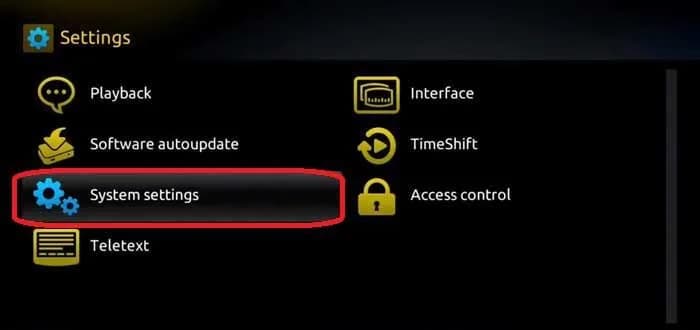
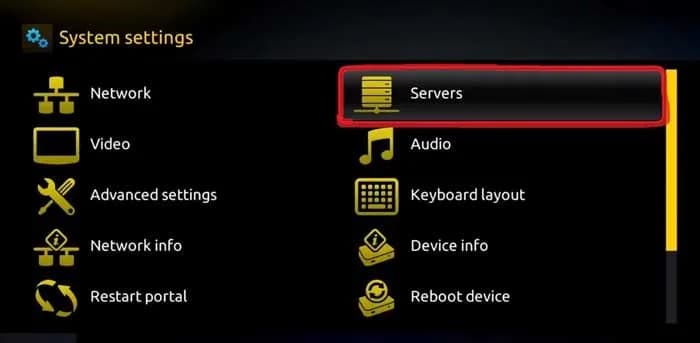
Step 2: Open Servers, then Portals
- Choose Servers.
- Choose Portals.
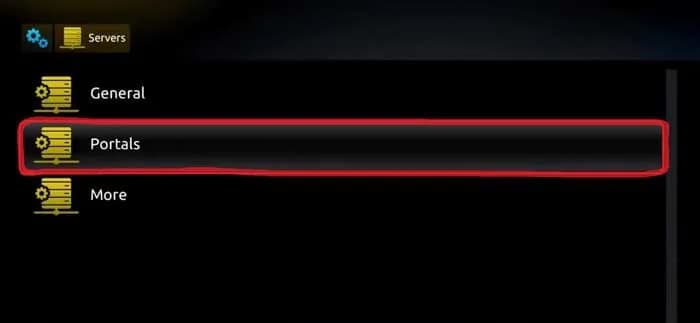
Step 3: Add the ZynTV portal
- In Portal 1 name, type ZynTV.
- In Portal 1 URL, type your Portal URL exactly as it appears in your welcome email.
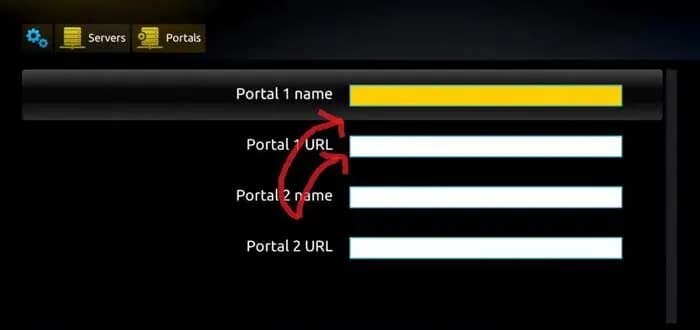
- Press OK to save.
Step 4: Restart the portal
- Go back to System settings and select Restart portal.
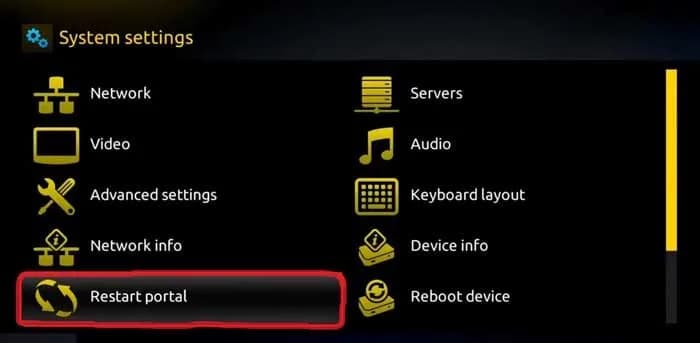
- The ZynTV portal loads with your channels.
Questions about MAG/STB
My box says the STB is blocked, or shows no channels. Why?
Your line is tied to the MAC address you entered when you ordered. Compare it with the MAC address on the label under your box and on your dashboard. If they differ, contact support with your order number.
The box is stuck on loading the portal. What should I check?
Check that the box is online in Settings > Network, and that the Portal URL is typed exactly as in your welcome email, including the http:// at the start and the /c/ at the end.
Why does the picture freeze or buffer?
Most often the home connection is the cause. Connect the box with a network cable if you can. Restart your router and your device, and check that you have at least 25 Mbps for 4K channels.
Ready to watch 30,000+ live channels?
Your login details arrive by email as soon as you pay, with 100,000+ films and series and 24/7 help with setup.